 Innocent.E
 Every time your browser shows that little padlock, there’s a whole chain of trust working behind the scenes — and when it breaks, you get a scary warning screen instead of a website. Here’s what’s actually going on, in plain English.
Why This Matters
Every website, internal app, and API that uses HTTPS relies on a digital certificate. Certificates prove identity (“this server really is bank.com”) and enable encryption. When a certificate expires or is misconfigured, users see browser warnings, connections break, and outages can hit revenue and trust. Understanding the basics lets you plan renewals instead of firefighting them.
The Core Concept: Key Pairs
Every certificate is built on a mathematically linked pair of keys. The private key stays secret on the server and proves ownership — it must never be shared. The public key is embedded in the certificate and handed out freely to anyone connecting to the server.
Think of it like a padlock and its key: the padlock (public key) can be handed out to anyone; only the matching key (private key) opens it. The certificate itself is essentially a signed statement that says “this public key belongs to this domain,” issued by a trusted Certificate Authority (CA) like DigiCert, Sectigo, or Let’s Encrypt.
Getting One: The CSR
A Certificate Signing Request (CSR) is a file you generate on your server containing your public key plus identifying info. You send it to a CA, they validate it, and issue a signed certificate back. The private key never leaves your server — not even inside the CSR.
Two fields matter most: the CN (Common Name), the primary domain the certificate protects, and the SAN (Subject Alternative Name) list — every extra domain and subdomain it should also cover. A single certificate for a mail server, for example, often bundles the root domain, www, webmail, cpanel, and a handful of other subdomains into one SAN list.
Why the Chain Matters
A certificate is rarely trusted on its own. It sits at the bottom of a chain of signatures that your browser walks upward until it hits a Root CA it already trusts:
- Root CA — pre-installed in your OS or browser’s trust store, kept offline, almost never signs certificates directly.
- Intermediate CA — signed by the root, does the actual day-to-day signing. The server has to send this along with its own certificate.
- Leaf certificate — your actual certificate, signed by the intermediate.
Here’s the real chain for one of my own domains, mail.beyondtheracks.ca:
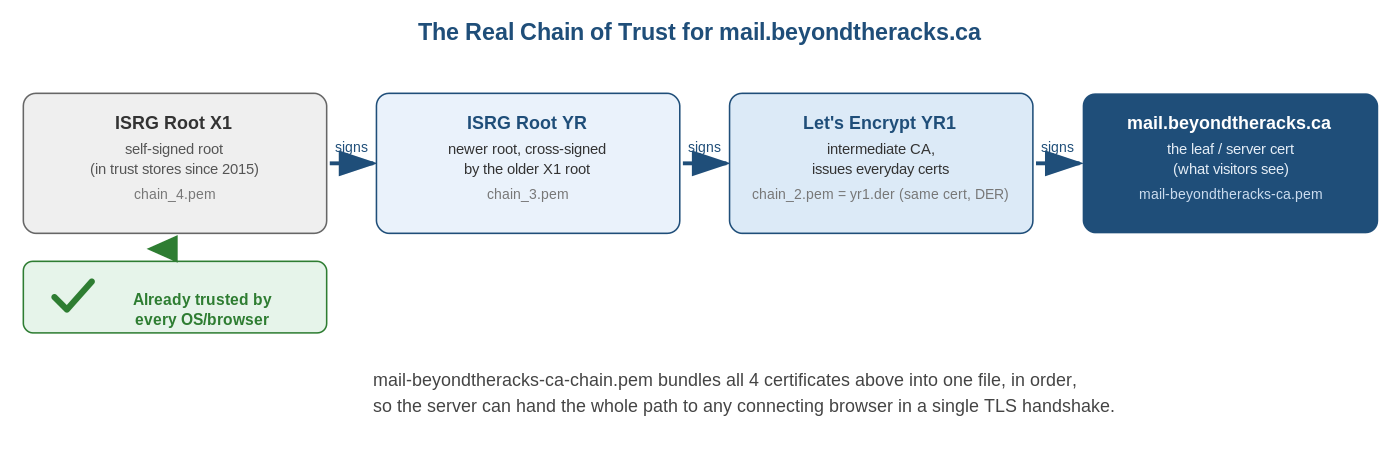
The most common real-world SSL mistake? A server sends only the leaf certificate and forgets the intermediate — browsers show “not trusted” even though the certificate itself is perfectly valid.
Can Someone Just Steal My Certificate?
Short answer: not usefully, and it gets caught fast. A certificate file by itself is basically a photocopy of an ID card — it proves nothing without the matching private key. Even with the public certificate files in hand:
- Hostname matching stops it from working on any other domain.
- Private key proof is still required to complete a TLS handshake — copying the public files alone never provides this.
- Revocation lets a CA or domain owner kill a compromised certificate immediately.
- Certificate Transparency logs mean every publicly trusted certificate is logged publicly the moment it’s issued, so an unexpected certificate for your domain gets noticed fast.
And shorter validity windows — more on that below — shrink the window even further.
Certificate File Types
| Format | Contains | Typical Use |
|---|---|---|
| .pem / .crt / .cer | Base64 text cert (and sometimes chain) | Linux/Unix web servers (Nginx, Apache). Human-readable, opens in a text editor. mail-beyondtheracks-ca.pem and the chain bundle are both this format. |
| .key | Private key (Base64 text) | Paired with a .pem/.crt cert on Linux servers. Keep permissions locked down. |
| .der | Binary-encoded cert | Java platforms; also opens via Windows’ built-in certificate viewer. The raw bytes are binary, not text — opening it in a plain text editor shows garbage, unlike a PEM file. The friendly Issued-to/Issued-by dialog you get on double-click comes from Windows decoding it for you, not from the file itself being readable. yr1.der is a real example — the same intermediate certificate as in the chain bundle, just in this binary form. |
| .pfx / .p12 | Cert + chain + private key, password-protected | Windows / IIS, Exchange, Azure. The only common format that bundles the private key. |
| .p7b | Cert chain only (no private key) | Windows and Java Tomcat for distributing chains without exposing keys. |
Note: .crt and .cer are file extensions, not guaranteed formats — the actual encoding (PEM text or DER binary) can vary, so check the file contents if unsure.
Renewal: What Changed in 2026
The CA/Browser Forum is phasing in much shorter maximum certificate lifetimes:
- Before March 15, 2026: 398 days
- March 15, 2026: 200 days
- March 15, 2027: 100 days
- March 15, 2029: 47 days
Manual renewal isn’t sustainable at these intervals anymore. If you’re not already automating issuance and renewal — ACME tools like Certbot, or an enterprise certificate lifecycle platform — now’s the time to start.
How It Actually Gets Installed
The exact steps depend on your platform, but the shape is the same everywhere: get the certificate onto the server, paired with its private key, then tell the web server which sites should use it.
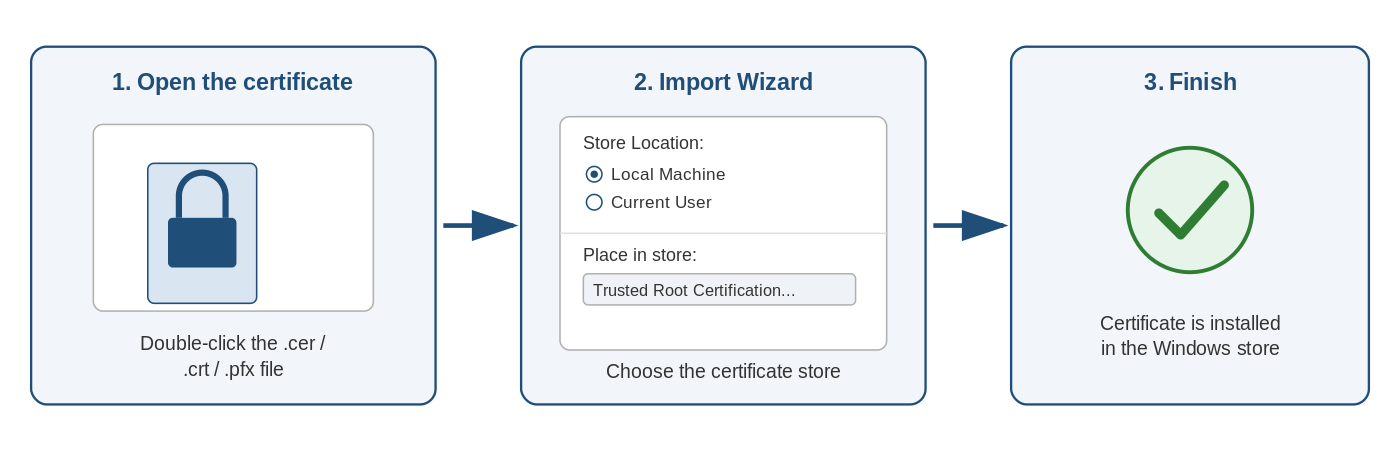
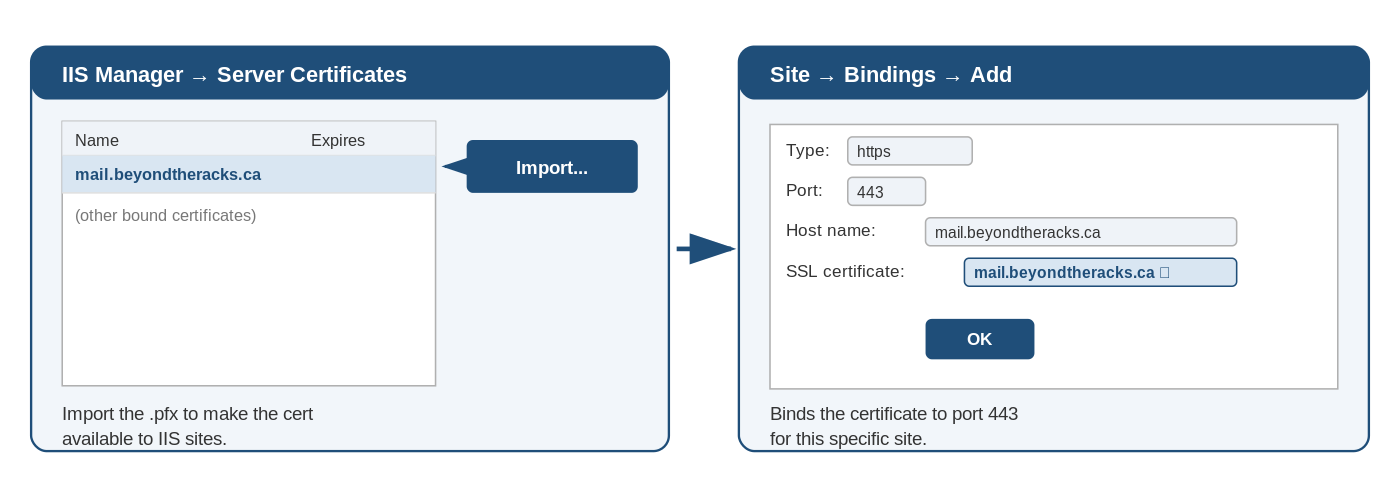
On Windows, you import the .pfx into the certificate store, then bind it to a site in IIS:
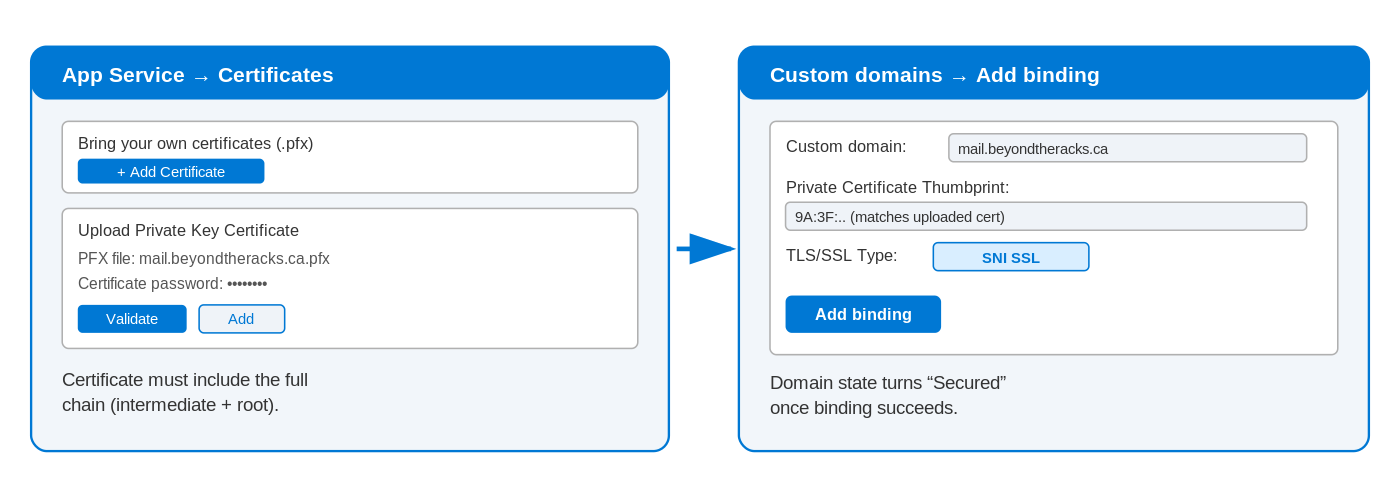
On Azure App Service, it’s the same .pfx bundle, just uploaded through the portal and bound to a custom domain:
On Linux, it’s config file references — Nginx’s ssl_certificate, Apache’s SSLCertificateFile — plus a service reload. No GUI needed.
I’ll go deeper on each of these platforms, command by command, in a follow-up post.
The Takeaway
Certificates aren’t magic — they’re a signed statement plus a very deliberate chain of trust. Once you understand key pairs, chaining, and why the private key is the thing that actually matters, the rest is mostly bookkeeping: knowing which file format your platform wants, and not letting renewal dates sneak up on you. With validity windows shrinking to 47 days by 2029, that bookkeeping is about to become a lot less optional.